Token Vault
Mobile SDKs: Card Data in iOS & Android Apps
TL;DR
PCI Proxy's Mobile SDKs give your iOS and Android apps a ready-made, native card entry experience. The SDK collects the card, sends it straight to the PCI Proxy vault, and hands your app a short-lived ID. Your server swaps that ID for tokens. You get card scanning, brand detection, theming, dark mode, wallets and 3D Secure, without building any of it, and card data never reaches your servers.
Mobile SDKs: How to Collect Card Data in Your App Without Touching It
For many businesses, the app is where customers spend most of their time: booking a ride, ordering dinner, renewing a subscription or managing a trip. Sooner or later, every one of those apps needs to ask for a card.
That single screen carries more weight than it looks. It has to feel native and quick, because a clumsy card form on a small screen is exactly where many mobile purchases are abandoned. And it has to be secure, because any card field that your own code controls brings your app and your backend into PCI DSS scope.
In this API Spotlight, we look at PCI Proxy's Mobile SDKs: what they are, why native apps need a different approach from the web, who they're for, and what they mean for your business.
What are the PCI Proxy Mobile SDKs?
The Mobile SDKs are native libraries for iOS and Android that take care of card collection inside your app. When your app needs a card, the SDK presents its own card entry screen, sends the card data straight to the PCI Proxy vault, and gives your app a short-lived reference that your server exchanges for tokens. You can think of them as the mobile counterpart of Secure Fields: your app owns the experience around the card entry, and PCI Proxy owns the card data inside it.
The reason native apps need their own solution comes down to how they're built. On the web, Secure Fields relies on iframes, which the browser keeps strictly separate from your own code. Native apps have no such boundary. Any text field you build in Swift or Kotlin belongs to your app, so whatever a customer types into it passes through your code. The SDK solves this by providing the card entry screen itself. The card number and security code are typed into the SDK's components and sent from there directly to PCI Proxy, so they never pass through your app's own code or reach your servers.
How the Mobile SDKs work
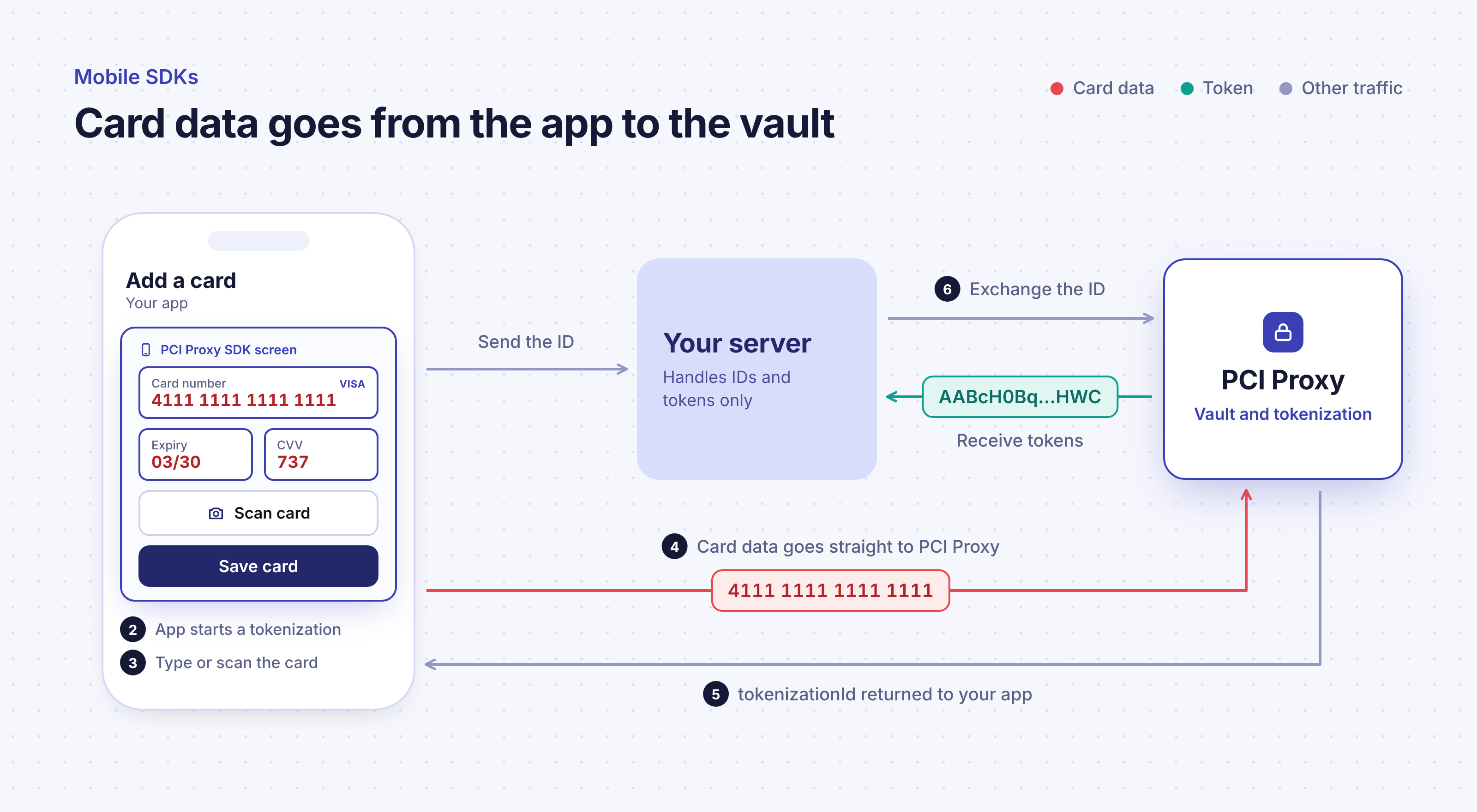
When your app needs a card, for example during onboarding or at checkout, it starts a tokenization and the SDK takes over the screen. The customer types their card details or simply scans the card with the camera. As they type, the SDK recognizes the card brand and checks the input, so mistakes are caught before they turn into failed payments. When required, the same flow runs 3D Secure authentication, and the SDK can also offer Apple Pay and Google Pay buttons alongside the card form.
Once the customer confirms, the card data goes from the SDK to the PCI Proxy vault, and your app is told whether the tokenization succeeded, failed or was canceled. On success, it receives a short-lived ID and a few card details for display. Your app passes that ID to your server, which exchanges it with PCI Proxy for the tokens and card information it needs.
The SDK screens are designed to feel like part of your app rather than a third-party add-on. You can match colors to your brand, the screens adapt to light and dark mode automatically, and they're available in eleven languages, including English, German, French, Italian and Spanish. For apps that need to stay small, such as iOS App Clips and Android Instant Apps, you can include only the parts of the SDK you actually use. There's also a mode that collects only the security code, for cases where you already hold the card as a token and just need a fresh CVV.
Who the Mobile SDKs are for
The Mobile SDKs are for any business that collects cards inside a native iOS or Android app. That includes mobility and ride-hailing apps, food and grocery delivery, subscription services, marketplaces, and hotel, airline and booking apps, in short any app where customers save a card once and pay with it many times.
For mobile developers, the appeal is time. A secure, accessible card form with scanning, validation, 3D Secure and wallet buttons is a substantial project on one platform, let alone two, and it needs ongoing maintenance as card schemes and operating systems evolve. The SDKs take that work off the roadmap. For payment and product managers, they offer a polished, conversion-friendly experience and keep card data out of the company's systems from day one.
If your checkout runs in a browser rather than a native app, Secure Fields is the right counterpart. And when you need to show a stored card back to the user in your app, Reveal, the mobile version of our Show API, does that without bringing card data back into your systems.
Mobile SDK use cases: saved cards, in-app checkout and bookings
Saving a card in your app
Ride-hailing, delivery, mobility and subscription apps ask for a card once and charge it many times. The SDK collects it during onboarding or in the account settings, and the token is used for every future charge.
In-app checkout
Marketplaces and retail apps collect a card at checkout on a native screen, then send the token to whichever payment provider processes the order.
Booking and travel apps
Hotel, airline and booking apps guarantee a reservation with a card, run 3D Secure where it's required, and keep the token until it's time to charge.
Refreshing a security code
When a provider needs a fresh CVV for a card already on file, the security-code-only mode collects it without asking the customer to enter the whole card again.
Why the Mobile SDKs matter for your business
The first benefit is security. Card data is entered into the SDK's components and sent straight to PCI Proxy, so it never passes through your app's own code or reaches your backend. Your servers, databases and logs only ever see tokens and card metadata, which keeps them out of the card data flow.
The second is conversion. Card scanning, instant brand recognition and clear validation remove the friction that makes people give up on mobile payments. Add wallet buttons, and many customers won't need to type anything at all.
The third is speed to market and flexibility. Instead of building and maintaining two card forms, your team adds one SDK per platform. And because the result is a provider-neutral PCI Proxy token, you can send it to the payment provider of your choice through the Forward Proxy, today and in the future.
Frequently asked questions
Can I use my own card form design?
You can theme the SDK screens with your brand colors, and they adapt to light and dark mode. The card fields themselves stay inside the SDK, which is what keeps card data away from your code.
Is the card scanner required?
No. It's optional, and on Android you can leave it out of your build entirely.
How do I show a stored card to the user later?
Use Reveal, the mobile version of the Show API. It displays the card number and security code in your app without bringing card data back into your systems.
Getting started
The SDKs are available for iOS and Android and can be added to an existing app like any other dependency. For installation, customization and integration details, see Mobile SDKs in our API documentation, or talk to the PCI Proxy team about your app.