Token Vault
Vault API: Tokenize Card Data Server-to-Server
.png)
TL;DR
The Vault API is PCI Proxy's direct line to the token vault. Your server sends card numbers, CVVs or other sensitive values, and gets tokens back, up to 100 values in one request. It's built for card data you already hold, such as a migration from a legacy system. Access is by request, and the API can also create network tokens in the same call.
The problem it solves
The Filter Proxy, Secure Fields and our Mobile SDKs all share one idea: card data is tokenized before it reaches you. That's the best place to be. But some companies start from a different place. They already hold card data.
Maybe you're moving off a legacy payment stack, and years of stored cards sit in an old database. Maybe you've acquired a business and inherited its card records. Or a batch file of cards lands on a server that's already in PCI scope. In each case, the data is already there. What you need is the fastest way to swap it for tokens, so the systems around it can leave PCI scope behind.
That's what the Vault API is for.
How the Vault API works
The Vault API is a server-to-server endpoint that talks directly to the PCI Proxy vault. There's no proxy and no frontend involved. You send a request with the values you want to protect, and PCI Proxy stores each one in its vault and returns a token in its place.
One request can hold up to 100 values, and you can mix types in the same batch:
- CARD: a card number
- CVV: a security code
- CUSTOM: any other sensitive value you'd rather not store yourself, such as a cardholder name
The response gives you a token for each value, plus a short summary of how many succeeded and failed. Card tokens come with useful extras: a masked card number for display, and a fingerprint. The fingerprint is the same for every token of the same card, so you can spot duplicates without ever comparing card numbers.
Need network tokens as well? Add one flag to a card request, and PCI Proxy also provisions a network token from the card scheme. It's stored behind the same PCI Proxy token, so your systems don't need to handle a second identifier.
Vault API use cases: migrations, card files and network tokens
Migrating card data from a legacy system
This is the classic case. You export the stored cards from your old provider or database, send them to the Vault API in batches of 100, and replace each card number with its token. Once the old data is deleted, the systems that only see tokens drop out of scope.
Tokenizing card files and batch imports
Some partners still deliver cards in files rather than API calls. If those files land on a system that's already in scope, the Vault API can tokenize their contents before anything moves further into your stack. (If the partner can send through an API instead, the Filter Proxy keeps the data from reaching you at all.)
Upgrading stored cards to network tokens
If you want the higher approval rates and automatic card updates that network tokens bring, you can request them as you tokenize, card by card, with no extra integration.
What these use cases have in common
In every case, the card data is already in your environment. The Vault API doesn't stop it from arriving, so the system that calls the API is still in PCI scope. What it does is shrink that scope to the smallest possible footprint, so everything downstream works with tokens only. That's also why access is by request: PCI Proxy reviews your use case first and points you to a collection method that keeps card data out entirely, wherever one fits.
Step by step: tokenizing cards with the Vault API
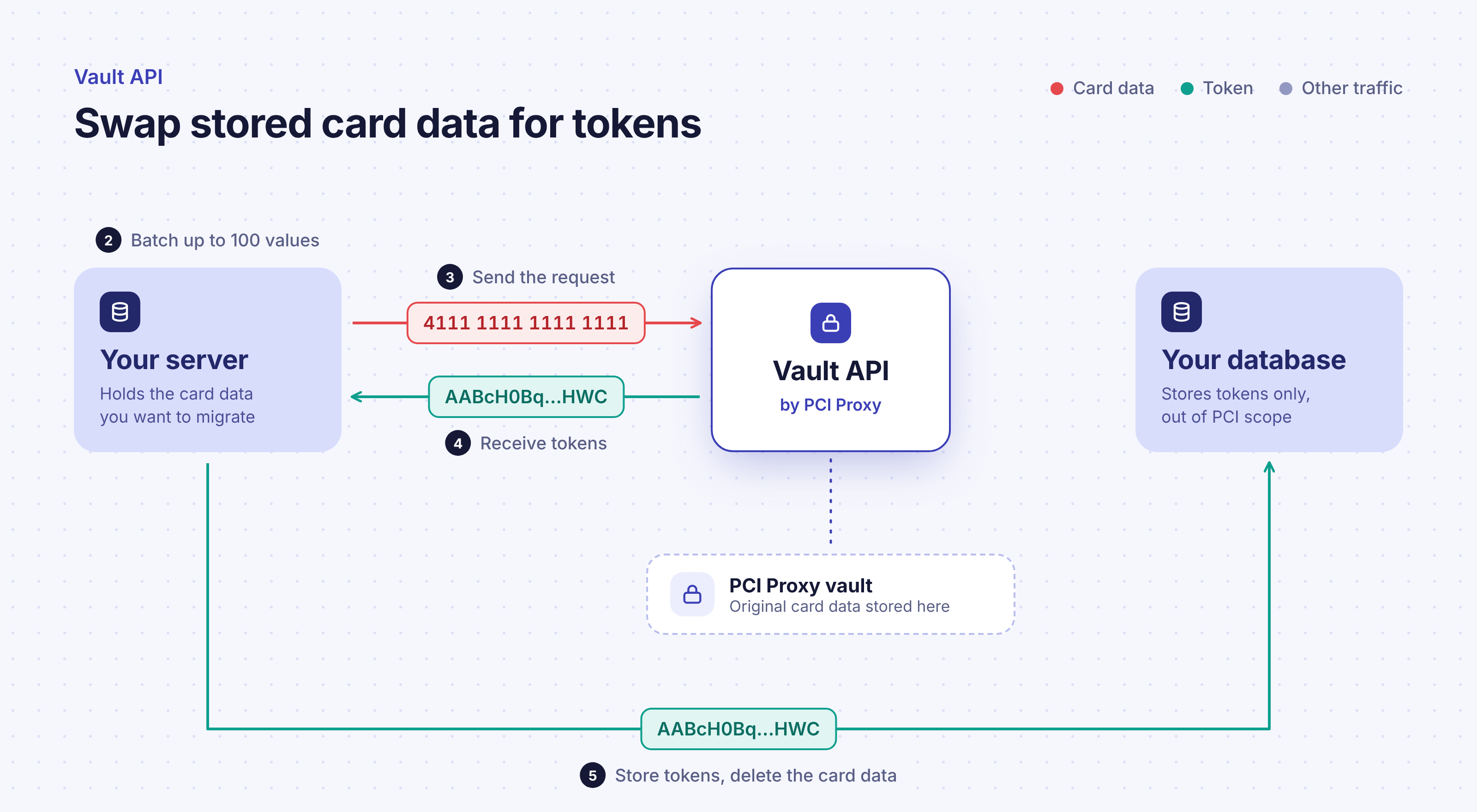
[Image: vault-api-flow.png]
- Request access. Contact PCI Proxy to request the Vault API. The team reviews your use case and activates it for your project.
- Prepare your batch. Group the values you want to tokenize, up to 100 per request. Mix cards, CVVs and custom values as needed.
- Send the request. Your server calls the tokenize endpoint, using your PCI Proxy credentials.
- Receive the tokens. PCI Proxy returns a token for each value, with a masked card number and fingerprint for cards, and a success and failure count for the batch.
- Replace and delete. Store the tokens in place of the original values, then securely delete the card data you no longer need.
When it's time to use the cards again, the Forward Proxy turns tokens back into card data on the way to your payment provider.
For request formats, response fields and network token options, see Vault: Tokenize and the API reference.
.png)
.png)
.png)
.png)