Token Vault
Secure Fields: PCI Compliant Card Forms
TL;DR
Secure Fields lets you build your own checkout form while PCI Proxy handles the sensitive inputs. The card number and CVV fields are iframes hosted by PCI Proxy, so what customers type goes straight to the vault. Your servers receive tokens, your form looks like the rest of your site, and you qualify for SAQ A, the lightest PCI DSS self-assessment.
Secure Fields: How to Collect Card Data on Your Website Without Touching It
Every online business that accepts cards eventually runs into the same trade-off. You can send customers to a hosted payment page, which keeps card data away from you but takes them out of your checkout at the most sensitive moment. Or you can build the payment form yourself, which gives you full control over the experience but pulls your website and servers into PCI DSS scope.
For a long time, teams simply had to pick one. Secure Fields exists so they don't have to: a checkout that looks and feels entirely like yours, with none of the card data passing through it.
In this API Spotlight, we look at Secure Fields: what it is, how the iframe approach works, who it's for, and why it qualifies you for the lightest PCI self-assessment there is.
What is Secure Fields?
Secure Fields is PCI Proxy's way of collecting card data on the web. It takes the sensitive inputs of your checkout form, the card number and the security code, and places them inside small iframes hosted by PCI Proxy. Everything else in the form, from the cardholder name to the expiry date and the pay button, remains entirely yours.
To the customer, it's one seamless form that matches the rest of your site. Behind the scenes, the two sensitive fields belong to PCI Proxy. When the customer submits the form, the card number and security code travel from those fields straight to the PCI Proxy vault. Your page and your servers receive tokens and card details such as the brand and a masked number, but never the card data itself.
The same approach works for more than cards. Secure Fields can also collect bank account details such as IBANs and account numbers, and it can add Apple Pay and Google Pay buttons to the same checkout.
How Secure Fields works
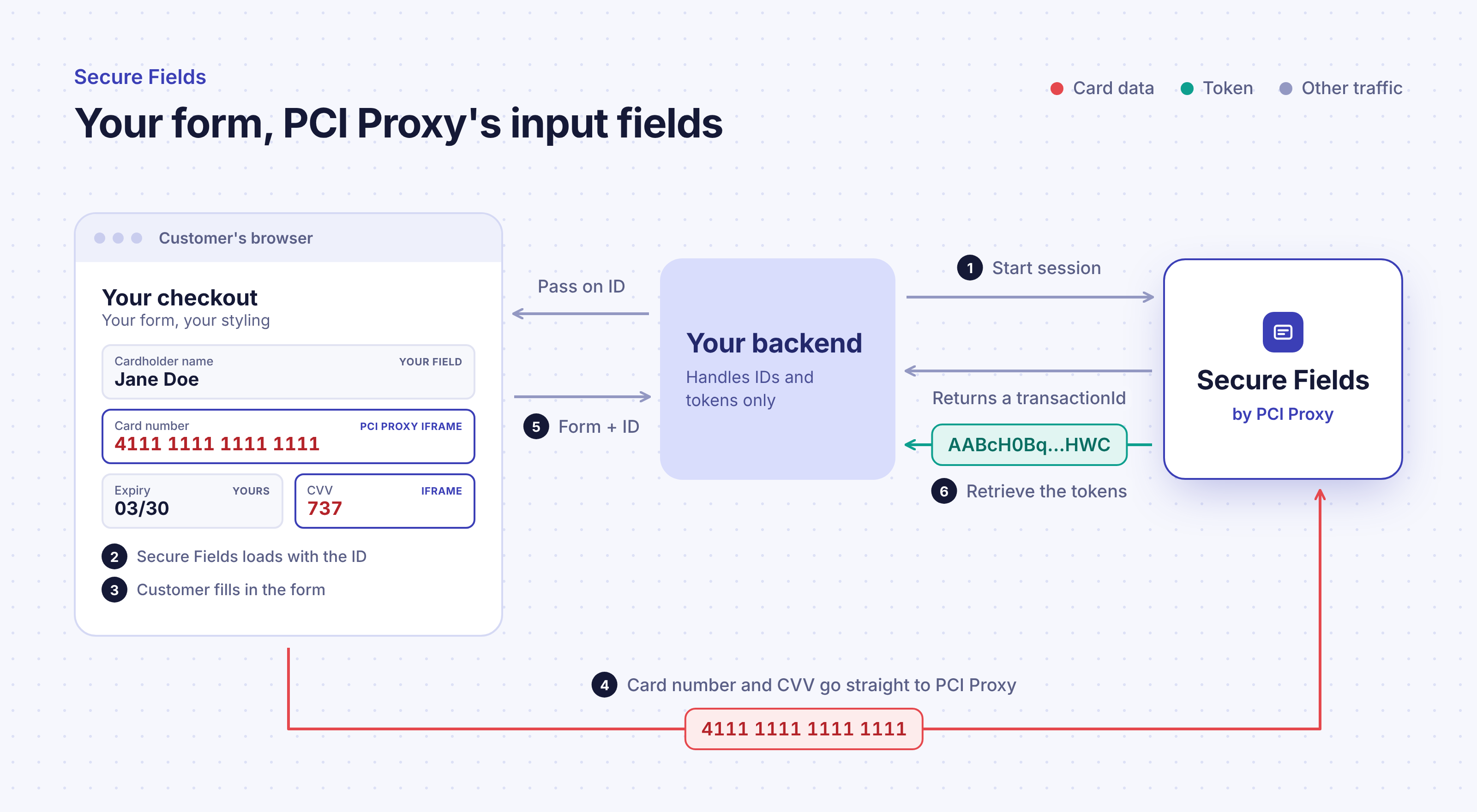
The technique behind Secure Fields is one you've almost certainly seen before. Think of an embedded map or video on a web page. It appears to be part of the page, but it's actually served from a different origin, and the browser keeps the two strictly apart. The page can't read what's inside the embed, and the embed can't read the page. Browsers call this the same-origin policy, and it's one of the oldest and most reliable security boundaries on the web.
Secure Fields puts that boundary around card data. Your checkout leaves an empty space wherever a sensitive field should go, and Secure Fields fills each one with its own PCI Proxy iframe. Your page's code can style those fields and react to what happens in them, but it can never read what the customer types. Once the form is submitted, the card data goes to PCI Proxy, and your page receives a short-lived reference that your backend exchanges for the tokens.
None of this means giving up on the experience. The fields can be styled to match your fonts, colors and layout, including how they look when the input is valid, invalid or empty. Secure Fields recognizes the card brand as the customer types and checks the input as they go, so your page can show a brand logo or highlight a mistake at the right moment. When you need it, the same fields can also run 3D Secure while the card is being collected, and request network tokens in the background for cards you plan to charge again.
Who Secure Fields is for
Secure Fields is for any business whose customers enter cards on its own website, and that wants that moment to feel like part of its own product. That covers e-commerce shops and subscription services, booking and travel platforms, marketplaces, and any SaaS product with an account page where customers manage a saved card.
It's built with two audiences in mind. Frontend developers get a form they can design freely, with no redirect and no third-party page to work around. Payment and compliance managers get a checkout that qualifies for SAQ A, the shortest PCI DSS self-assessment questionnaire.
If your checkout lives in a native iOS or Android app rather than a browser, the Mobile SDKs do the same job natively. And for cards collected by phone, email or chat, Tokenization by Link is the better fit.
Secure Fields use cases: checkouts, bookings and customer portals
E-commerce and subscription checkouts
Shops and subscription businesses collect the card during checkout or signup in a form that looks entirely like their own, then use the token for the first charge and every renewal after it.
Booking and travel platforms
Booking platforms collect the guest's card to guarantee a reservation, with 3D Secure where it's required, and keep the token until it's time to charge.
Customer portals and account settings
SaaS products and service providers let customers add or replace a saved card in their account area, without that page ever coming into PCI scope.
Multi-PSP checkouts
Because Secure Fields returns a PCI Proxy token rather than one tied to a single provider, the same checkout can feed any payment provider a business routes to.
Why Secure Fields matters for your business
For many payment managers, the headline benefit is SAQ A. Every business that accepts cards has to validate its PCI DSS compliance each year, and smaller merchants do this with a Self-Assessment Questionnaire. Which questionnaire applies depends on how card data reaches you. A checkout where your own page handles card data typically falls under far longer questionnaires with many technical controls, and one where card data reaches your servers under the full set of requirements. A checkout built on Secure Fields qualifies for SAQ A, the shortest of them all. That translates directly into less audit work, fewer controls to maintain and lower compliance costs, year after year.
The second benefit is conversion. Customers stay on your site, in a form that matches your brand, at the moment they're most likely to hesitate. There's no redirect to a page that looks different, and no break in the experience that makes people wonder whether they're still in the right place.
The third is flexibility. Because the result is a provider-neutral PCI Proxy token, the card can be sent to whichever payment provider you choose through the Forward Proxy, and the checkout doesn't need to change if you add or switch providers later.
Frequently asked questions
Can I fully customize the look of the fields?
Yes. You control fonts, colors, sizes, placeholders and the styling for each state of the fields, so they match the rest of your form. Custom fonts are uploaded to PCI Proxy, because the fields can't load external resources.
Which fields are inside the iframes?
Only the sensitive ones: the card number and security code, or the bank account details. You collect the cardholder name, expiry date and everything else in your own fields.
Can I offer Apple Pay and Google Pay too?
Yes. The hosted wallet buttons are delivered through Secure Fields, so they fit into the same checkout. See Wallet Tokenization in this series for more.
Getting started
Secure Fields can be added to an existing checkout without redesigning it. For setup, styling options and integration examples, see Secure Fields in our API documentation, or talk to the PCI Proxy team about your checkout.