Token Vault
Wallet Tokenization: Apple Pay & Google Pay
.png)
TL;DR
With Wallet Tokenization, PCI Proxy receives the encrypted payment data from Apple Pay or Google Pay, decrypts it, and returns a PCI Proxy token. You get the fast checkout that wallets offer, plus a token you can send to any payment provider. Card data never touches your servers. You can use a hosted button, your own wallet integration, or our Mobile SDKs.
Wallet Tokenization: Accept Apple Pay and Google Pay
Think about the last time you paid on your phone. You probably didn't type a card number at all. You tapped a button, glanced at the screen or touched the sensor, and the payment was done. That ease is why digital wallets have become one of the most popular ways to pay online, especially on mobile.
For the business on the other side of that tap, things are less simple. Behind it is an encrypted package of card data that someone has to unlock, and a decision, often made without much thought, about which payment provider gets to do it. That decision quietly determines who controls your wallet payments from then on.
In this API Spotlight, we look at Wallet Tokenization: what happens inside a wallet payment, how PCI Proxy turns it into a token you own, and which businesses benefit most.
What is Wallet Tokenization?
Wallet Tokenization lets PCI Proxy receive the encrypted payment data from Apple Pay and Google Pay, decrypt it, and store the card in its vault. In return, you get a regular PCI Proxy token. You can send that token to any payment provider you work with, store it for later, or use it for future charges, exactly as you would with a card collected any other way.
To understand why that matters, it helps to know what a wallet actually sends. When a customer confirms a payment, the wallet doesn't hand over a plain card number. It creates an encrypted payment token that only a certified payment provider can open. Inside is either the real card number from the customer's card, known as the FPAN, or, far more often, a device-specific card number issued by the card scheme, known as the DPAN. Apple Pay always uses device numbers, and so does Google Pay for cards added to an Android phone. Those payments also carry a cryptogram, a piece of authentication data that proves the customer confirmed the payment on their own device.
Most businesses let their payment service provider decrypt the wallet token. It works, but the card then lives with that provider, in a form only that provider can use. PCI Proxy is a certified Apple Pay and Google Pay payment provider, so it can take on the decryption instead. The difference is who ends up holding the card: with Wallet Tokenization, it's a token that belongs to you rather than to your PSP.
How Wallet Tokenization works
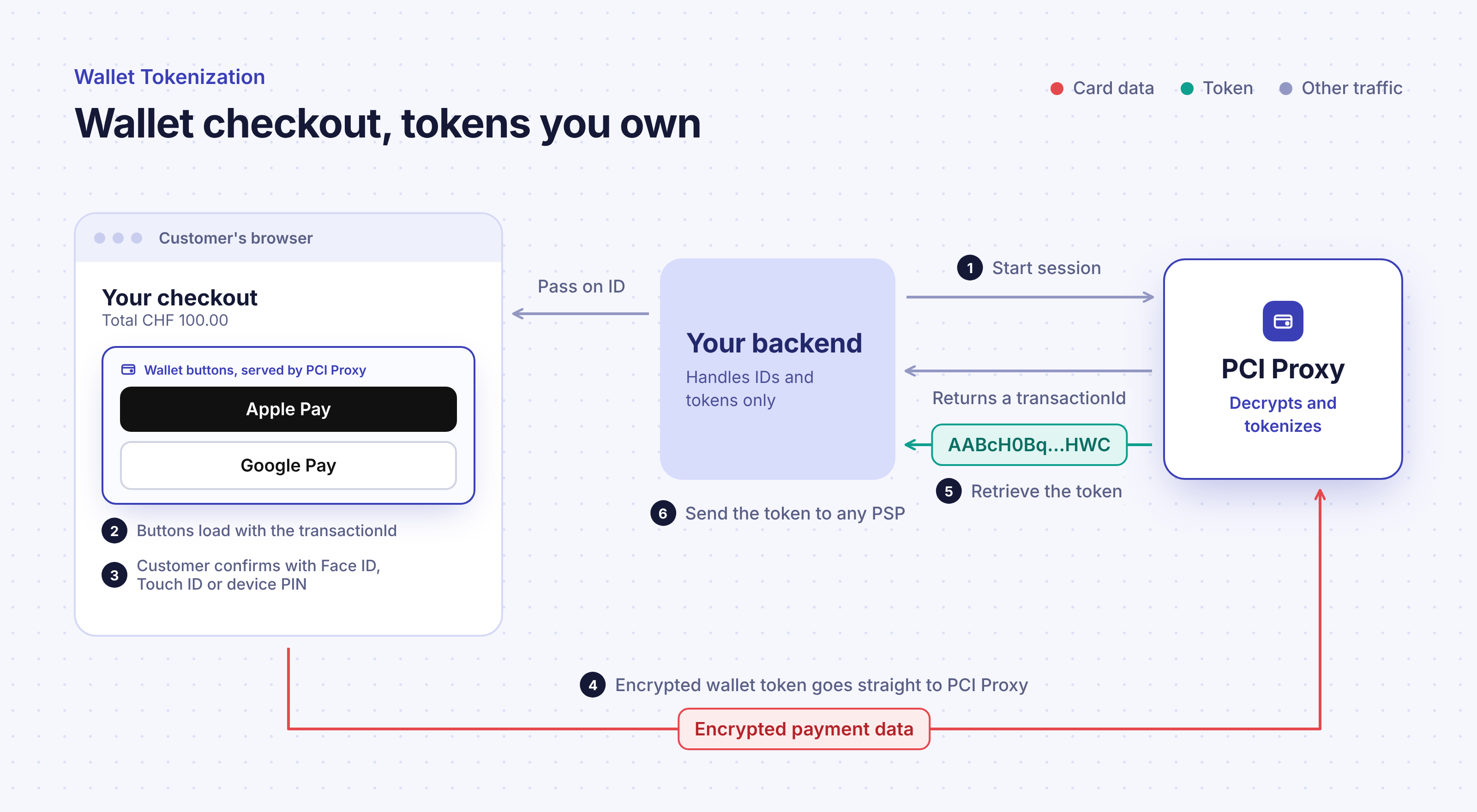
From the customer's point of view, nothing changes. They tap the Apple Pay or Google Pay button, choose a card and confirm with Face ID, Touch ID or their device PIN. The difference is where the encrypted payment data goes next. Instead of travelling to a PSP, it goes straight to PCI Proxy, which decrypts it, stores the card in its vault and makes a token available to your backend. Your servers never see a card number.
Along with the token, PCI Proxy tells you which wallet the payment came from and the last four digits of the customer's real card, so you can show them which card they used even when the card behind the scenes is a device number. Where the wallet provides authentication data, PCI Proxy passes it on as well. For most device payments, that means you keep the liability shift that comes with a strongly authenticated payment, without asking the customer to complete an extra 3D Secure step.
There are three ways to bring the wallet buttons into your checkout, depending on how much control you want. The hosted button is the quickest route: PCI Proxy provides ready-made Apple Pay and Google Pay buttons through Secure Fields and handles the onboarding with both wallet providers, so there's almost nothing to set up. The self-hosted button is for teams that want full control over the look and flow of their checkout. You integrate the Apple Pay and Google Pay APIs directly and pass the encrypted token to PCI Proxy for conversion. And if your checkout lives in a native app, the Mobile SDKs include pre-built wallet buttons for iOS and Android.
Who Wallet Tokenization is for
Wallet Tokenization is for any business that wants to offer Apple Pay and Google Pay without tying those payments to a single provider. It's especially valuable for merchants and platforms that work with more than one PSP or payment orchestrator, that want the freedom to change providers in the future, or that need to store wallet-sourced cards and charge them later, sometimes through a different provider than the one that took the first payment.
For payment managers, it's a decision about flexibility and negotiating power: wallet volume no longer belongs to whichever provider decrypted it. For developers, the hosted button means adding wallets to a checkout that already uses Secure Fields with very little extra work, while the self-hosted option leaves room for a fully custom experience.
Wallet Tokenization use cases: multi-PSP, travel and mobile commerce
Multi-PSP and orchestration setups
Businesses that route payments across several providers can send each wallet payment to whichever one fits best, for cost, approval rates or the customer's country. Because the token is provider-neutral, the routing decision stays theirs.
Travel and booking platforms
Booking platforms often take a card at the time of booking and charge it later, sometimes on behalf of a hotel, airline or tour operator using its own provider. Wallet Tokenization gives travelers a one-tap checkout, while the platform keeps a token it can pass to the right merchant when the time comes.
Mobile-first commerce
On a phone, typing card details is exactly where many purchases are abandoned. Wallets remove that step entirely. Wallet Tokenization lets mobile-first businesses capture that conversion boost while keeping card data out of their own systems.
Why Wallet Tokenization matters for your business
The first benefit is security and compliance. The encrypted wallet token travels from the customer's device to PCI Proxy, and only PCI Proxy decrypts it. Your checkout and backend receive a token and some card details, never the card number, which keeps them out of the card data flow just like the other collection methods in this series.
The second benefit is commercial independence. When your PSP decrypts wallet payments, those cards are effectively locked to that PSP. Adding a second provider, moving volume for better rates, or switching altogether would mean losing them. With a PCI Proxy token, your wallet customers come with you wherever you route payments, through the Forward Proxy.
The third benefit is the customer experience itself. Wallet payments are fast, familiar and authenticated on the device, which helps conversion, especially on mobile. Wallet Tokenization lets you offer that experience without giving anything up on the back end.
Frequently asked questions
Do I need my own Apple Pay and Google Pay setup?
Not with the hosted button. PCI Proxy handles the onboarding with both wallet providers; for Apple Pay, you only enable it in the PCI Proxy dashboard and register the domains where the button appears. With the self-hosted button, you set up the wallet integrations yourself.
Can I charge a wallet card again later?
The PCI Proxy token works like any other card token, so you can store it and use it again. Whether a later charge is approved depends on your payment provider and the card scheme rules for that type of payment.
Do I still need 3D Secure?
For most device payments, the wallet's own authentication covers it. For Google Pay cards saved to a Google account rather than a device, a separate 3D Secure step may be needed, which PCI Proxy also offers.
Getting started
If you already use Secure Fields, the hosted button is the quickest way to add Apple Pay and Google Pay with tokens you own. For setup details and the different integration options, see Wallet tokenization in our API documentation, or talk to the PCI Proxy team about the right setup for your checkout.
.png)
.png)
.png)
.png)