Token Vault
Show API: Display Card Data Securely
TL;DR
The Show API from PCI Proxy lets your users see the full card number or CVV of a card you store as a token. The card data is rendered in a secure iframe hosted by PCI Proxy, so it goes straight from the vault to the browser and never passes through your servers. Access is by request, for end users only, and your app must handle login and MFA.
How to Display Card Numbers to Users Without Touching Card Data
You've done the hard work. Card data enters your system as tokens, and those tokens are what you store and pass around. Then a product requirement arrives: users need to see their full card details.
Maybe you issue virtual cards and your users need the number and CVV to pay online. Maybe your platform stores guest cards, and your customers need to read one to charge a no show. Either way, showing a card number seems simple: detokenize it, return it from an endpoint, and render it in the UI.
That shortcut brings raw card data back into your stack. The endpoint that returns the number, the server that renders it, and the logs that record the response all come back into PCI DSS scope. You're back where you started.
The Show API solves this with a technique you've probably already used. Think of an embedded map or video. It appears on your page, but it's served from another origin, and your page's JavaScript can't read what's inside it. The browser's same-origin policy keeps the two apart. The Show API uses the same idea for card data. PCI Proxy renders the card number inside an iframe it hosts, and you embed that iframe on your page. Your user sees the card, but your frontend code can't read it, and your backend never receives it.
The use cases
The Show API is built for one scenario: an authenticated end user needs to see a card . Two areas come up again and again.
Showing virtual card details in card issuing apps
This is the classic case. If your app issues virtual cards, whether for spending, subscriptions, or single-use payments, your users need the full card number and CVV to pay with them. The Show API displays those details in your app, styled to match your UI. It happens on demand, only when the user asks, and your backend never handles the card data.
Letting hotels view guest cards
If you run a channel manager, property management system, or booking platform, you store guest cards on behalf of your hotel customers. Sometimes a hotel needs to see a card, for example to charge a no-show fee on its own terminal. With the Show API, your platform can show that one card to that one authorized hotel user, while your platform stays out of the card data flow.
How the Show API keeps card data out of your stack
The Show API splits the work into two paths.
Your backend handles everything except the card data. It checks who the user is, decides whether they're allowed to see a card, and asks PCI Proxy to prepare the display. It works only with tokens and a short-lived ID.
PCI Proxy handles the card data. It reads the card from its vault and sends it directly to an iframe in the user's browser. This uses Secure Fields, the same iframe technology PCI Proxy uses to collect card data on the web. You control how the iframe looks, but the data inside it belongs to PCI Proxy's origin.
The link between the two paths is a transactionId. Your backend receives it from the Show API and passes it to the frontend, and the iframe uses it to load the card. The ID is valid for 30 minutes and can be used only once. Treat it like a password: don't store or log it, and use it right away.
Step by step: revealing a card with the Show API
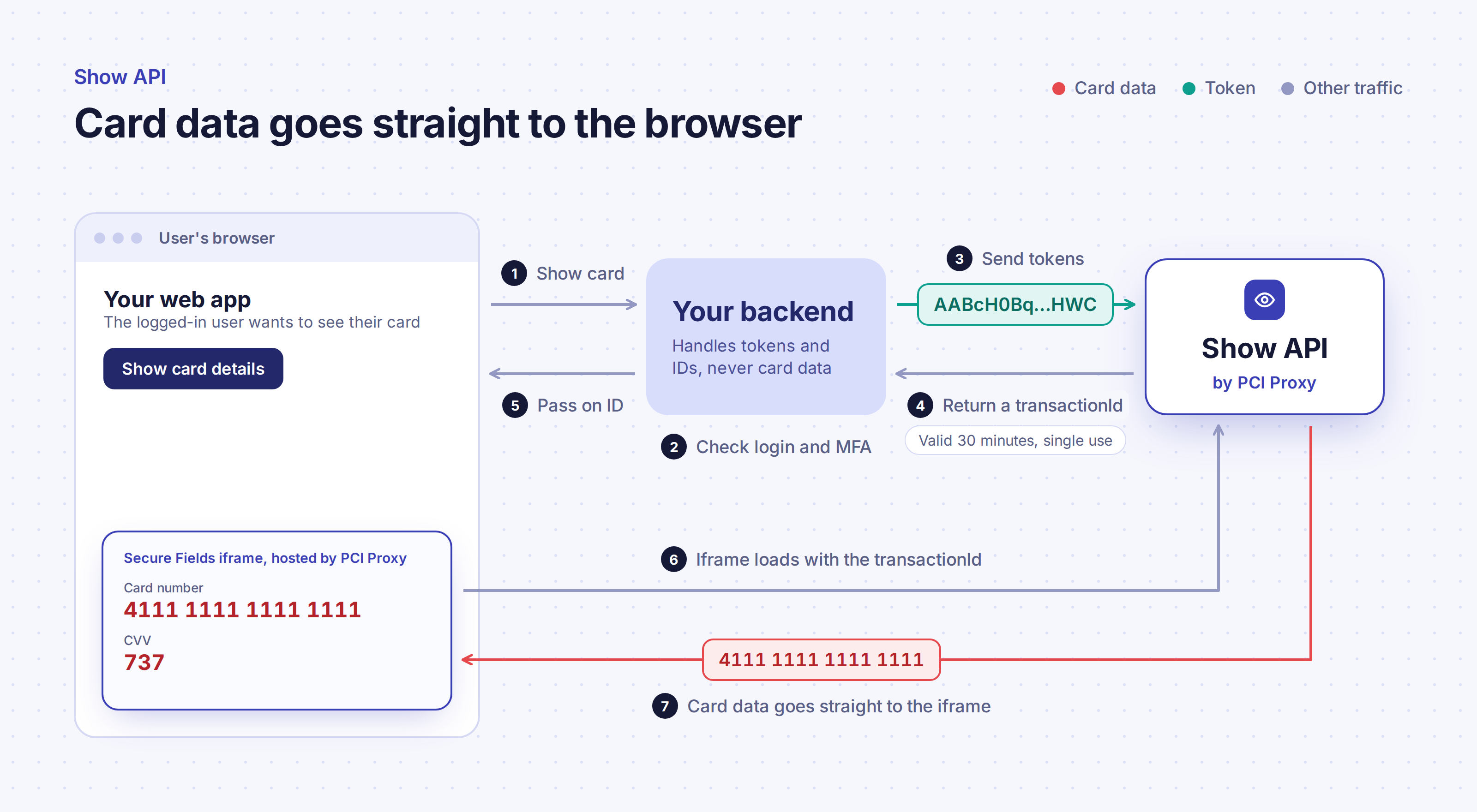
- The user asks to see their card. For example, they click "Show card details" in your web app, and the request goes to your backend.
- Your backend checks access. It confirms the user is logged in, has completed multi-factor authentication, and is allowed to see this specific card.
- Your backend sends the tokens. It calls the Show API with the card and CVV tokens for that user.
- PCI Proxy returns a
transactionId. The ID is valid for 30 minutes and can be used once. - Your backend passes the ID to the frontend. At this point, your backend's work is done, and it never saw a card number.
- The iframe loads. Your page renders Secure Fields and initializes it with the
transactionId. - Card data goes straight to the iframe. PCI Proxy sends the card number and CVV directly into the iframe, where your user can see them. They never pass through your servers or your own frontend code.
For request formats, and styling options, see the Show API quick start and How Show works in the API documentation.
Your side of the deal: security requirements for the Show API
The Show API greatly reduces your PCI scope, but it doesn't remove it entirely. You're still responsible for making sure the right person is looking at the card. The Show API doesn't authenticate users, so your application has to. PCI Proxy checks the following before granting access:
Access is by request. You can request access to the Show API in the PCI Proxy dashboard under Project Settings. PCI Proxy's team then reviews your use case with you.
Login and MFA are mandatory. Your application needs a login, the Show feature must be protected with multi-factor authentication, and your backend must confirm that each user is allowed to see the specific card they're requesting.
Every user needs a unique login. Shared accounts aren't allowed, so every card view can be traced to an identifiable person.
Your password policy has to meet PCI DSS. This includes minimum length and complexity, regular password rotation, account lockout after repeated failed attempts, and session timeouts. The full list is in the Show API security and compliance guide, based on Requirement 8 of the PCI DSS standard.
If you're building a card issuing app or a customer portal, you probably have most of these controls already. The Show API lets you add card display on top of them without bringing card data back into your stack.